This article is for administrators.
Important:
- Carriers now require registration,.
- Consequently, all unregistered accounts will have delivery issues.
- Follow the Registration Steps and Best Practices in this article if you experience any issues.
Overview
Paycor Recruiting integrates with a third-party provider, Twilio, to allow clients to text message candidates from within our system. Your team can enable the text messaging service from the Marketplace tab in Paycor Recruiting.
Why Register for Text Messaging?
A few years ago, new rules were made to cut down on spam texts. Since 08/31/23, A2P 10DLC (Application to Person 10 Digit Long Code) is required for any business that sends texts to U.S. phone numbers.
- Phone carriers enforce this rule. If a business is not registered, its texts may be filtered or blocked.
Twilio is our texting provider. We send your registration info through Twilio. Then, The Campaign Registry (TCR) reviews and approves all A2P 10DLC registrations in the U.S.
The process has two steps:
- Brand Registration: TCR checks your company info against federal records.
- Campaign Registration: TCR reviews how you plan to text people. They look at your opt-in and opt-out language, privacy policy, and sample messages.
- Campaign approval usually takes 5–10 days.
- It can take longer if TCR has a backlog.
Register for Text Messaging
- Select the Marketplace tab, then go to Overview > Text Messaging.
- Select Get Started. The Activate Text Messaging window opens. Use it to finish registration and turn on text messaging for your company account.

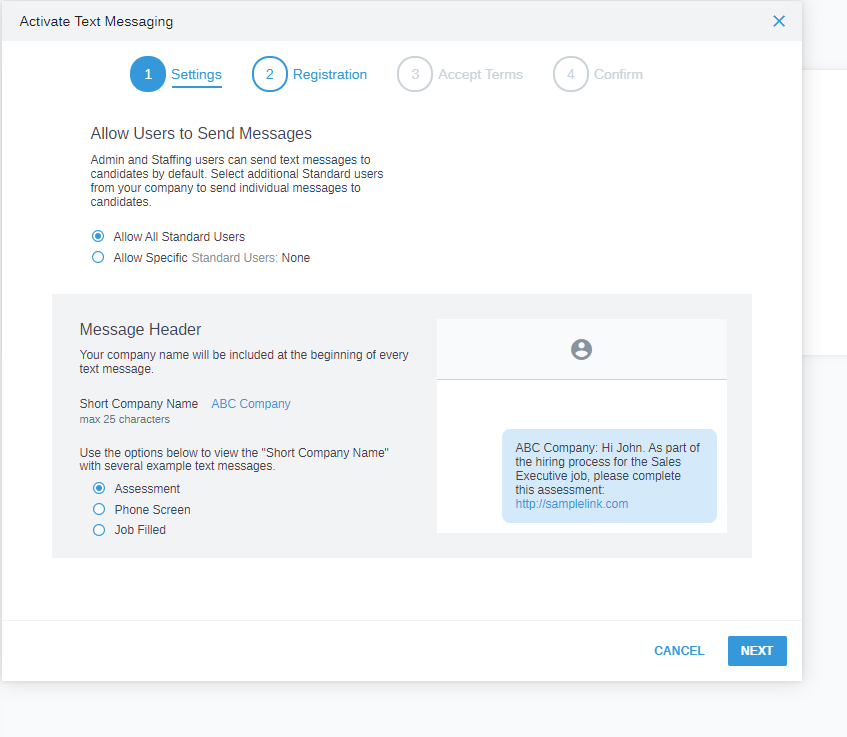
- On the Settings tab, choose who can send text messages.
- By default, all Administrators and Staffing Users can send text messages.
- You can:
- Allow all Standard Users to send texts.
- Allow only specific Standard Users to send texts.
- Block specific Standard Users from sending texts.
- You can also set your organization's Short Company Name.
- It is added at the start of every text your team sends.
- This helps candidates know who sent the message.
-
Note:
- If your company is publicly traded on a stock exchange, there is a one-time extra email check.
- Soon after you submit your registration, you get an email from noreply@auth.campaignregistry.com with the subject Required: Verify Your Email Address to Enable 10DLC SMS Messaging.
- Click the link in the email. Enter your name, job title, and company email to confirm your brand.
- If you do not verify within 7 days, your registration will be rejected.
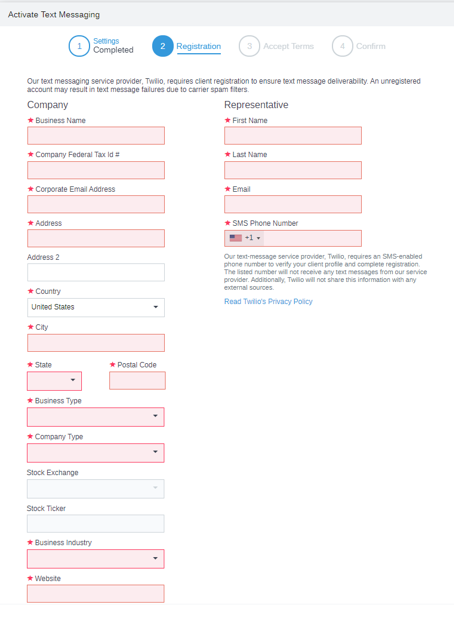
- On the Registration tab:
- Enter your company's registration information.
- You must register your client profile with Twilio to turn on texting.
- This helps keep your texts from being blocked by carriers like Verizon, AT&T, and T-Mobile.
- To complete the registration, you must:
- Submit your company name and company contact information.
- Enter contact information for a specific representative from your organization.
- Make sure the representative's phone number can receive SMS texts. Twilio requires this to complete the client profile.
- Enter your company's registration information.
-
Registration screen for existing customers:

-
Registration screen for new customers:
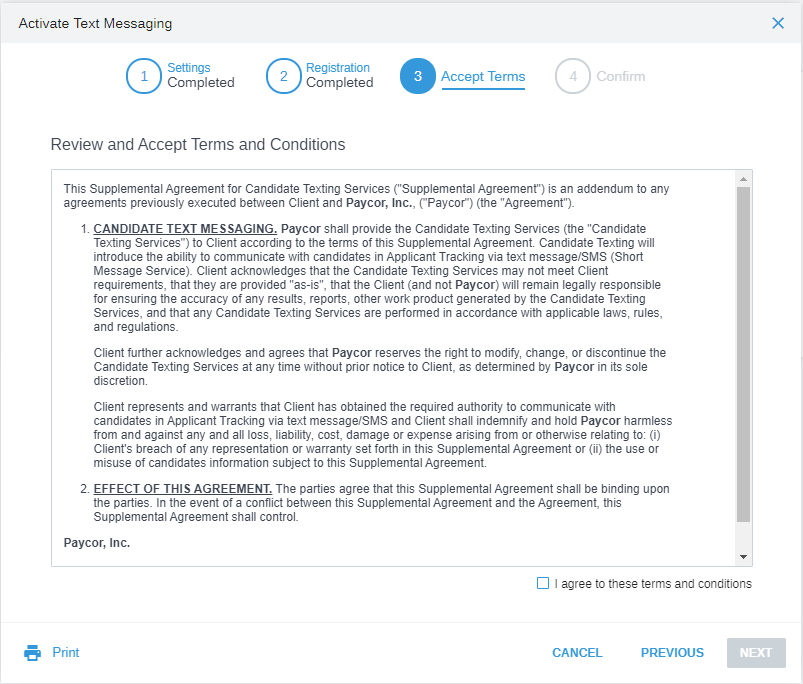
- After you enter your registration information, the Supplemental Agreement for Candidate Texting Services opens. Read the terms and conditions. Check the I agree to these terms and conditions box. Click Next.
- A confirmation screen opens, like this sample screenshot, with more details about the registration process.
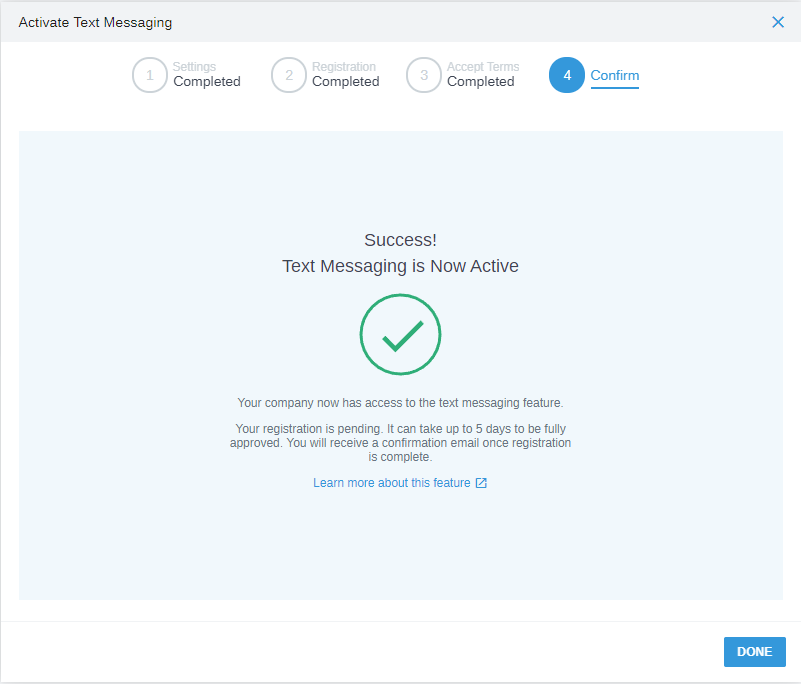
- Click Done. The Text Messaging Settings screen opens. Here you can:
- Review or change your text messaging plan.
- Check your registration status.
- Review or change your registration information.
- Update other text messaging settings as needed.
Timeframe for Setup to be Complete
- Client profile registration with Twilio usually takes 5 –10 business days.
- Sometimes, The Campaign Registry (TCR) has a backlog, so it can take longer.
- Your company's administrators get an email when the registration is complete.
- To check status, go to Marketplace > Settings > Text Messaging.

Frequently Asked Questions
How do I find my company’s EIN?
If your company is based in the United States, you can find your EIN using any of the following methods:
- If your company is publicly traded and registered with the Securities and Exchange Commission, search the SEC’s EDGAR database at no cost.
- Contact your company’s accountant or finance office and request the EIN.
- Review your company’s Form W‑2 or any federal or local tax filings stored online.
Does my Legal Company Name need to match IRS records exactly?
Yes. Your legal company name must match IRS records exactly. Do not shorten it or use a DBA or trade name. If it does not match, your Brand registration will fail.
Can I use a DUNS number instead of an EIN?
No. U.S. companies must give a valid EIN. A DUNS number is not accepted and will cause the registration to be rejected.
Which company address should I use?
Use your legally registered business address. Do not use a local branch, regional office, or mailing-only address. The address must match federal tax records for your legal entity.
What Company and Business Type should government entities use?
Government organizations should choose Business Type “Non-profit Corporation” and Company Type “Government.”
My industry is not shown in the Business Industry drop-down menu. What should I select?
The list of industries is made by The Campaign Registry. If your industry is not listed, pick the option that is closest to your business. Government groups should choose “Government.” Non-profit groups should choose “Non-Profit.”
Why is my registration pending longer than 5–10 days?
All A2P 10DLC registrations in the U.S. must be reviewed by The Campaign Registry (TCR). Sometimes TCR has a lot of registrations to check. When they are busy, it can take longer than 10 days.
Updated: February 16th, 2026 6153 views 0 likes
*This content is for educational purposes only, is not intended to provide specific legal advice, and should not be used as a substitute for the legal advice of a qualified attorney or other professional. The information may not reflect the most current legal developments, may be changed without notice and is not guaranteed to be complete, correct, or up-to-date.